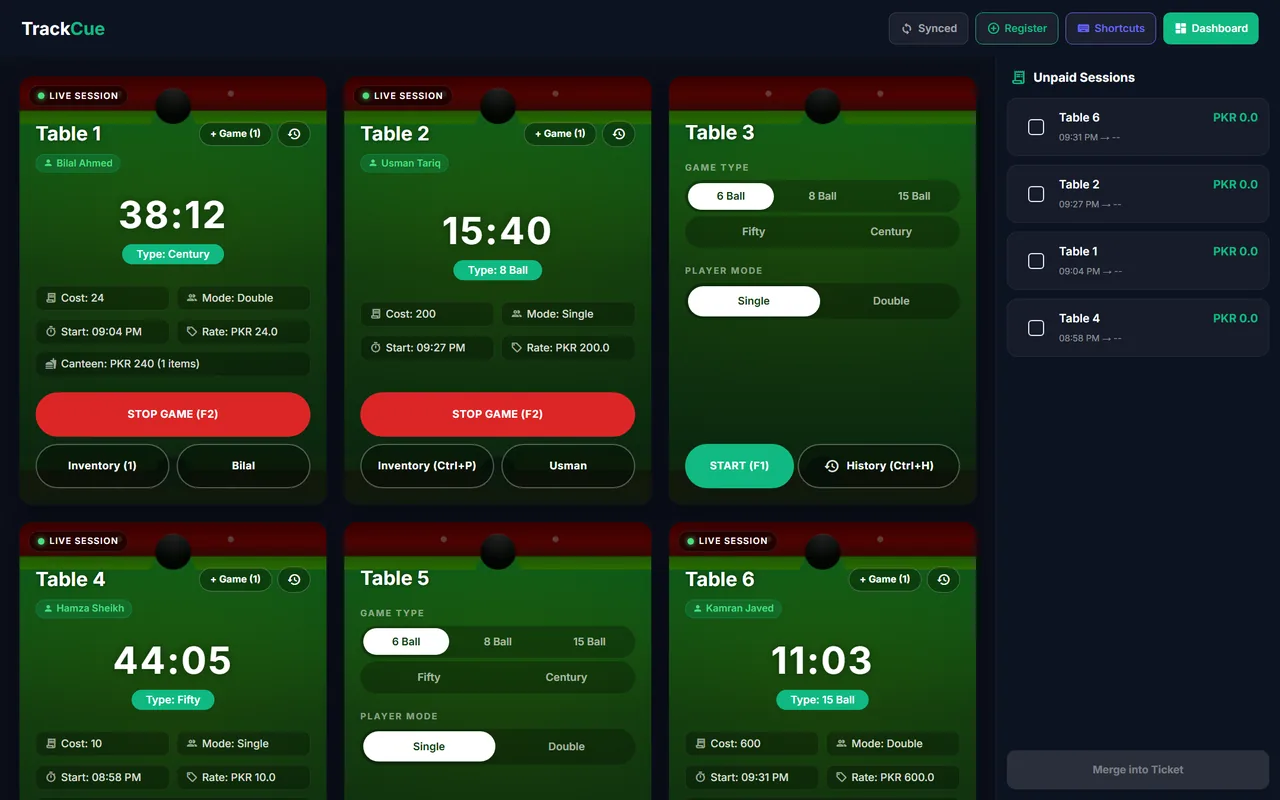
How a game works in QUE TRACK
- Start. On a free table card, choose the game type and Single or Double, then press Start (F1). The card turns into a live session with a running timer.
- Assign a player. Optionally attach a member to the table so the bill can go on their khata later.
- Add more. Press + Game for another game on the same table, or Inventory (Ctrl+P) to add canteen items to the table's bill.
- Stop. Press Stop Game (F2). The session moves to the Unpaid Sessions panel with its total.
- Collect. Take payment in cash, or put it on the member's khata. Several tables can be merged into one ticket.
What each table card shows
- Live timer and start time
- Game type, player mode (Single or Double) and rate
- Running cost, including canteen items added to the table
- The member playing, if one is assigned
- Session history (Ctrl+H)
Built for a busy counter
The live screen is made for the counter PC. Keyboard shortcuts cover the common actions: F1 start, F2 stop, Ctrl+H history, Ctrl+P add a canteen item, Ctrl+M add a member, Ctrl+S sync and Ctrl+D open the dashboard. An optional dashboard PIN keeps staff on the table screen and out of your settings and reports.
Each finished session shows a receipt on screen in a standard 80mm layout, with the table, game, times, canteen items and total. Every game is also saved to game history, so you can check any table's earnings later.
Set your prices once
Prices live in Pricing Rules: one entry per game type with its price in PKR. Not sure what to charge? Read how to price snooker and pool tables for profit.
Table timers & game billing: common questions
You set up a price list once, with a price for each game type (6 Ball, 8 Ball, 15 Ball, Fifty, Century). When you start a game you pick the game type and whether it is Single or Double; Double counts as two. QUE TRACK adds up the games played on the table, plus any canteen items, into one bill.
Yes. Press "+ Game" on the table card to add another game to the same session. The session history shows every game played.
Yes, if you set a default duration for the table. Once a game passes that time, the card border blinks red and a beep repeats every 10 seconds until you act.
Yes. Finished games go to the Unpaid Sessions panel. Tick the ones you want and press "Merge into Ticket" to collect them as one payment, in cash or on a member's khata.
No. On Windows, QUE TRACK blocks closing and minimizing the window while any game is active, so a running table cannot be lost by accident.